Bar Series
The Bar Series — The Beating Heart of Vyapari
The Bar Series lies at the very core of Vyapari’s data engine.
It’s a chronologically ordered list of Bars, each representing a slice of market time — neatly lined up by their Open Time.
The diagram below shows a fragment of a 15-minute Bar Series — each box is a Bar, proudly displaying its Open Time.
Note "For the User"
You, the user, will rarely interact with the Bar Series directly.
But you *must* understand how it’s built and how it evolves if you want to craft powerful, reliable **Strategies** in Vyapari.

How Big Is a Bar Series?
The size of a Bar Series depends entirely on the data source it’s built from.
For example, if we construct a 1-minute Bar Series using live data from the Dalal (broker), we might have about 3 months of historical data.
Definedge, for instance, provides roughly 90 days of 1-minute data.
That means:
- 1-minute Bar Series:
90 days × 375 bars/day = 33,750 bars - 15-minute Bar Series:
90 days × 75 bars/day = 6,750 bars - Daily Bar Series:
90 days × 1 bar/day = 90 bars
Bar Index — The Backbone of the Bar Series
Because a Bar Series is a sequential list, it has a first and a last Bar.
The first Bar always has a Bar Index of 0.
So, if a 1-minute Bar Series contains 33,750 Bars,
the last one’s index will be 33,750 − 1 = 33,749.
This Bar Index is the key to everything in Vyapari — Indicators, Strategies, Backtests — all live and breathe by it.
Tip "Golden Rule"
A **Bar Series** is an ordered list of Bars,
each with a unique **Bar Index**, starting at 0.
Why Is the Bar Index So Important?
Because the Bar Index is how we refer to Bars and Indicator values.
If you want to access the previous bar’s indicator value, you simply look at Bar Index − 1.
Two bars back? Bar Index − 2.
Simple, powerful, essential.
Managing the Bar Series During a Trading Day
During live trading, Vyapari continuously listens to a stream of tick data from the Dalal — each tick being a tiny heartbeat from the Exchange.
As each tick arrives, Vyapari identifies its Instrument and updates that instrument’s Live Bar in the Bar Series.
When the time boundary for the current Bar ends, Vyapari automatically closes the current Bar and creates a new one at the end of the series.
Thus, the Bar Series grows organically throughout the trading day.
Let’s illustrate with an example.
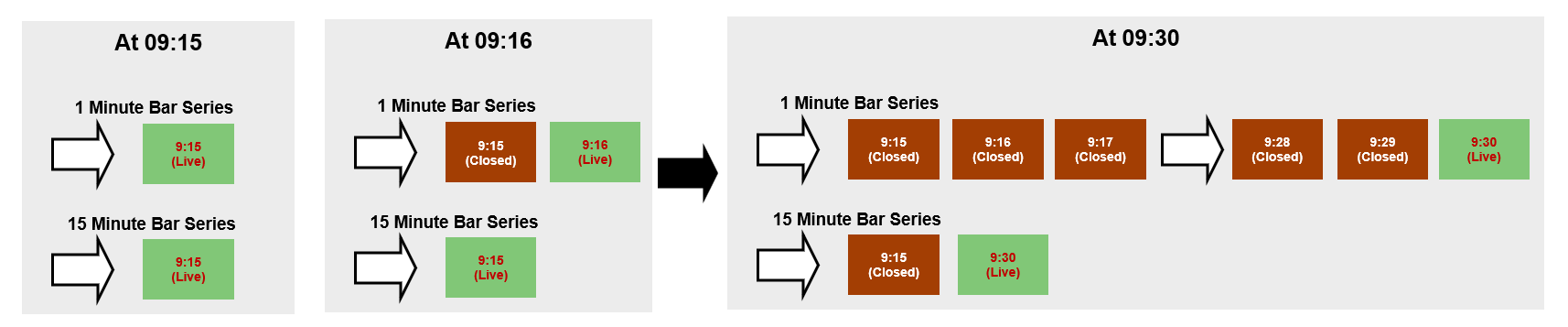
Suppose we’re tracking TCS-EQ at both 1-minute and 15-minute time frames.
That means Vyapari is managing two Bar Series — one for each time frame.
At 09:15, Vyapari creates one new 1-minute Bar and one new 15-minute Bar.
Both Bars open at the price of the first tick that arrives at or after 09:15.
As more ticks flow in, Vyapari updates the High, Low, Close, and Volume of both Bars in real time.
At 09:16, Vyapari creates a new 1-minute Bar, marking the 09:15 Bar as Closed (Historical).
Now, the 09:16 Bar becomes the Live Bar of the 1-minute series.
However, the 15-minute Bar opened at 09:15 is still live — it won’t close until 09:30.
At 09:30, a new 15-minute Bar will be created, and the 09:15 one will be marked Closed.
By default, Vyapari maintains two Bar Series per Instrument:
- 1 Minute
- Daily
Additional time frames are created automatically as required by your Strategy.
For example, if your Strategy runs on a 15-minute time frame, Vyapari will maintain three Bar Series:
1-minute, 15-minute, and Daily.
Bar Series and Strategies
Now, let’s talk about how Bar Series connect with Strategies.
Every Strategy in Vyapari is a collection of Rules, each containing one or more Indicators.
All of them share the same Bar Series — which means they operate on the same Time Frame.
If you want to combine multiple time frames, you use a Scanner.
A Scanner can run multiple Strategies (say, 5-minute and 15-minute) and trigger a Trade only when all of them signal at the same moment.
Example: Multi-Time-Frame Scanner
Let’s say we have a Scanner called NIFTY_Trend_Long with two Strategy sets:
- One runs on 5-minute Bars
- The other on 15-minute Bars
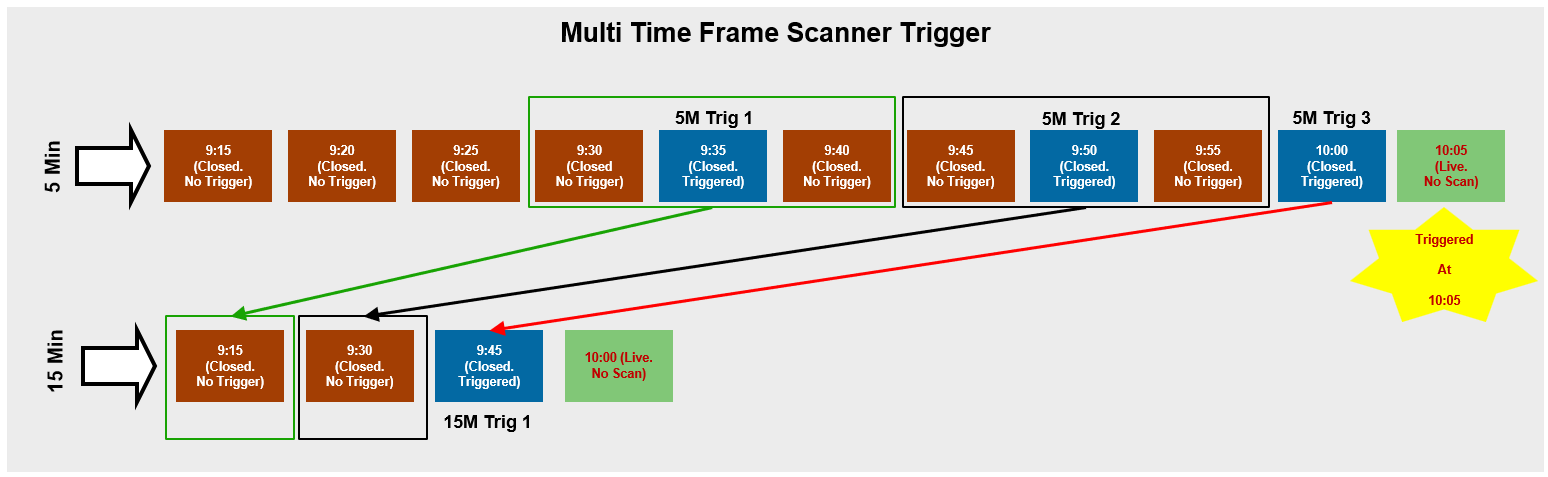
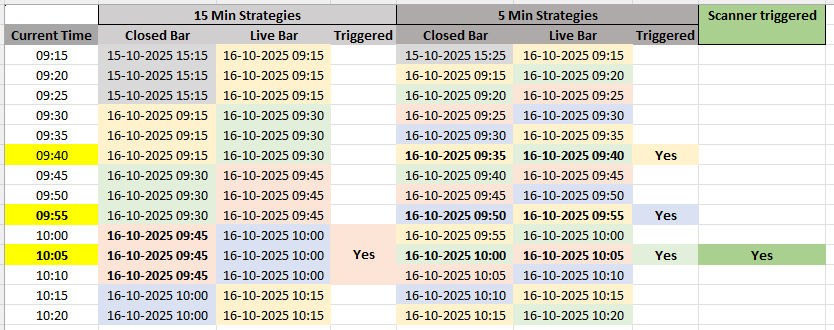
Here’s how the two Bar Series play out during the morning session:
-
At 9:35 — The 5-minute Bar closes.
Strategies on the 5-minute series trigger around 9:40.
But since the 15-minute Bar (9:30) is still live, no trigger yet. -
At 9:50 — Another 5-minute Bar closes (triggering again).
The 15-minute 9:30 Bar just closed, but didn’t trigger. Still no trade. -
At 10:00 — The 5-minute and 15-minute Bars align.
The 5-minute Strategy triggers at 10:05, and the 15-minute Bar (9:45) also closed with a trigger.
Both signals confirm — Trade Triggered!
The Big Picture
Understanding how Bars behave within a Bar Series is fundamental to mastering automated algorithmic trading.
This isn’t unique to Vyapari — it’s how every serious trading platform works.
Warning "Resource Limits"
Vyapari imposes *no limit* on the number of Bar Series per Instrument.
The only limits are your system’s **memory** and **CPU power**.
Vyapari will scale gracefully — until your hardware says *enough*.
Refer to the ReadMe in each release for recommended system specs.
Every Bar Series is always tied to a specific Instrument.
Tip "Historical Data Storage"
Vyapari can locally store both **Daily (corporate-action-adjusted)** and **1-minute** data for backtesting.
You’ll need to collect and store this data using Vyapari’s tools to build your historical database.