Watchlist
Watchlist — Your Personalized Collection of Instruments
A Watchlist in Vyapari is a user-defined collection of Instruments belonging to the same Exchange.
Vyapari does not provide any default Watchlists — you are free to create and manage your own based on your trading interests and strategy focus.
Purpose and Role
The Back & Forward Test Engine and the Trade Engine both operate on Watchlists — collectively referring to them as their Universe.
Each Watchlist defines the scope of data and instruments the engines will act upon.
Note "Exchange Restriction"
A Watchlist can contain Instruments "only from a single Exchange".
For example, you may create a Watchlist named “Large Cap Stocks” containing instruments from "NSE (Cash".
However, you cannot include Stock Futures or Options in the same Watchlist — those belong to a different Exchange segment.
Vyapari also defines a special Exchange named “All”, which allows you to create Watchlists containing Instruments from multiple Exchanges.
In such Watchlists, each Instrument still retains awareness of its own Exchange.
Tip "Best Practice"
Keep your Watchlists "Exchange-specific".
Use separate Watchlists for "Stocks", "Futures", and "Options", since each category behaves differently in terms of liquidity, volatility, and trading rules.
Watchlist Management
Watchlists are managed using the Watchlist Window, accessible from the Vyapari → Tools menu.
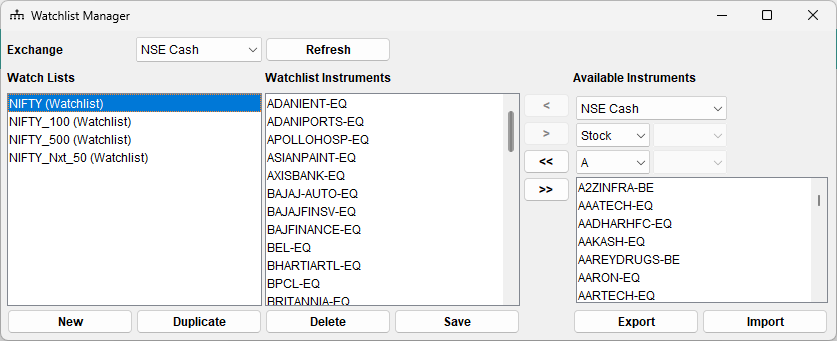
The Watchlist Window allows you to:
- ➕ Create new Watchlists
- 🧩 Duplicate existing Watchlists
- ❌ Delete Watchlists
- 🔍 Browse & Add Instruments via the built-in Instrument Browser
The Instrument Browser
The Instrument Browser helps you quickly locate and add instruments to your Watchlist.
- Select the Exchange (e.g., NSE Cash, BSE Cash, MCX, etc.)
- Choose the Instrument Type — Stock, Index, F&O, Currency, Commodity, etc.
- Vyapari automatically filters available instruments based on your selection.
For example:
If you select NSE Cash and Stock, Vyapari will only show Equity symbols from that segment —
you won’t see Index Futures or Options in the list.
Tip "Smart Filtering"
The Instrument Browser dynamically narrows results as you refine your selection — making it easier to find exactly what you need.Importing and Exporting Watchlists
Vyapari lets you export your Watchlists to CSV files and import them back at any time.
This feature is especially useful for sharing Watchlists between different Vyapari installations or team members.
Export
- Save your existing Watchlist as a
.csvfile. - The file will contain one Instrument per line, prefixed by its Exchange code.
Import
- Load a CSV file to instantly recreate the Watchlist in Vyapari.
- The file must follow the correct format (see example below).
Example CSV Format
NSE:ADANIENT-EQ
NSE:ADANIPORTS-EQ
NSE:APOLLOHOSP-EQ
NSE:ASIANPAINT-EQ
NSE:AXISBANK-EQ
NSE:BAJAJ-AUTO-EQ
NSE:BAJAJFINSV-EQ
Note "Sharing Watchlists"
Exported CSV files can be freely shared and imported on other Vyapari installations —
a convenient way to standardize or distribute Watchlists across trading setups.
Summary
- A Watchlist groups Instruments from a single Exchange.
- The Trade Engine and Back & Forward Test Engine operate on these Watchlists (their Universe).
- Vyapari provides tools to create, import, export, and manage Watchlists effortlessly.
- The special Exchange “All” allows multi-exchange Watchlists if needed.
Keep your Watchlists focused, well-organized, and Exchange-specific —
and Vyapari will handle the rest with clockwork precision.